


Cursor can use local MCP servers over stdio and remote servers over HTTP or SSE. For one developer connecting a Mac to a Backlog space, local stdio is the shortest path: Cursor starts Nulab’s server when needed, the server uses your Backlog API key, and no local port is exposed.
Verified: September 2, 2026. This guide targets Apple silicon and macOS Sequoia 15.5. Nulab’s current package is
0.20.0and requires Node.js 22 or newer.
Before opening Cursor settings
Create a Backlog API key under Personal Settings → API. Give the key a memo such as “Cursor MCP on MacBook Pro” so it is easy to identify and revoke. Your space hostname looks like example.backlog.com or, in some regions, example.backlogtool.com; do not include https://.
Check the local runtime:
node --version
command -v npx
You need Node 22 or newer. On an Apple-silicon Homebrew installation, npx is commonly /opt/homebrew/bin/npx. Use the path printed on your Mac.
Choose global or project scope
Cursor reads both locations:
~/.cursor/mcp.json— personal, available in every project..cursor/mcp.json— specific to the current repository and suitable for sharing only when it contains no secrets.
If the same server name exists in both, Cursor’s project configuration takes precedence. For a personal Backlog key, start with the global file.
Open Customize → MCPs in Cursor, or create ~/.cursor/mcp.json directly:
{
  "mcpServers": {
    "backlog": {
      "command": "/opt/homebrew/bin/npx",
      "args": ["-y", "backlog-mcp-server@0.20.0"],
      "env": {
        "BACKLOG_DOMAIN": "YOUR-SPACE.backlog.com",
        "BACKLOG_API_KEY": "YOUR_BACKLOG_API_KEY",
        "ENABLE_TOOLSETS": "space,project,issue"
      }
    }
  }
}
The -y flag prevents npx from waiting for an install confirmation that Cursor cannot answer. Pinning 0.20.0 prevents a surprise upgrade during startup.
Keep the project file secret-free
Cursor supports interpolation in command, args, env, url, and headers. A team-safe project entry can therefore refer to a variable:
{
  "mcpServers": {
    "backlog": {
      "command": "/opt/homebrew/bin/npx",
      "args": ["-y", "backlog-mcp-server@0.20.0"],
      "env": {
        "BACKLOG_DOMAIN": "YOUR-SPACE.backlog.com",
        "BACKLOG_API_KEY": "${env:BACKLOG_API_KEY}",
        "ENABLE_TOOLSETS": "space,project,issue"
      }
    }
  }
}
The variable must be visible to Cursor’s process. An app launched from Finder or the Dock may not inherit variables exported by .zshrc. If interpolation resolves to an empty value, launch Cursor from a configured shell for the test, or use a user-scoped configuration/credential wrapper that fits your organization’s policy. Do not “fix” this by committing the key.
Verify the connection
Open Cursor’s MCP list and confirm backlog is connected. Cursor CLI users can also run:
agent mcp list
agent mcp list-tools backlog
Then ask Agent for three read-only checks:
Use Backlog MCP to call get_myself. Do not call any write tool.
Call get_space and tell me the space key and name. Do not modify anything.
Read issue DEMO-123 and its comments. Return the summary, status,
assignee, acceptance criteria, and unresolved questions. Do not edit code yet.
The server is ready when the authenticated identity, space, and known issue all match what you see in Backlog.
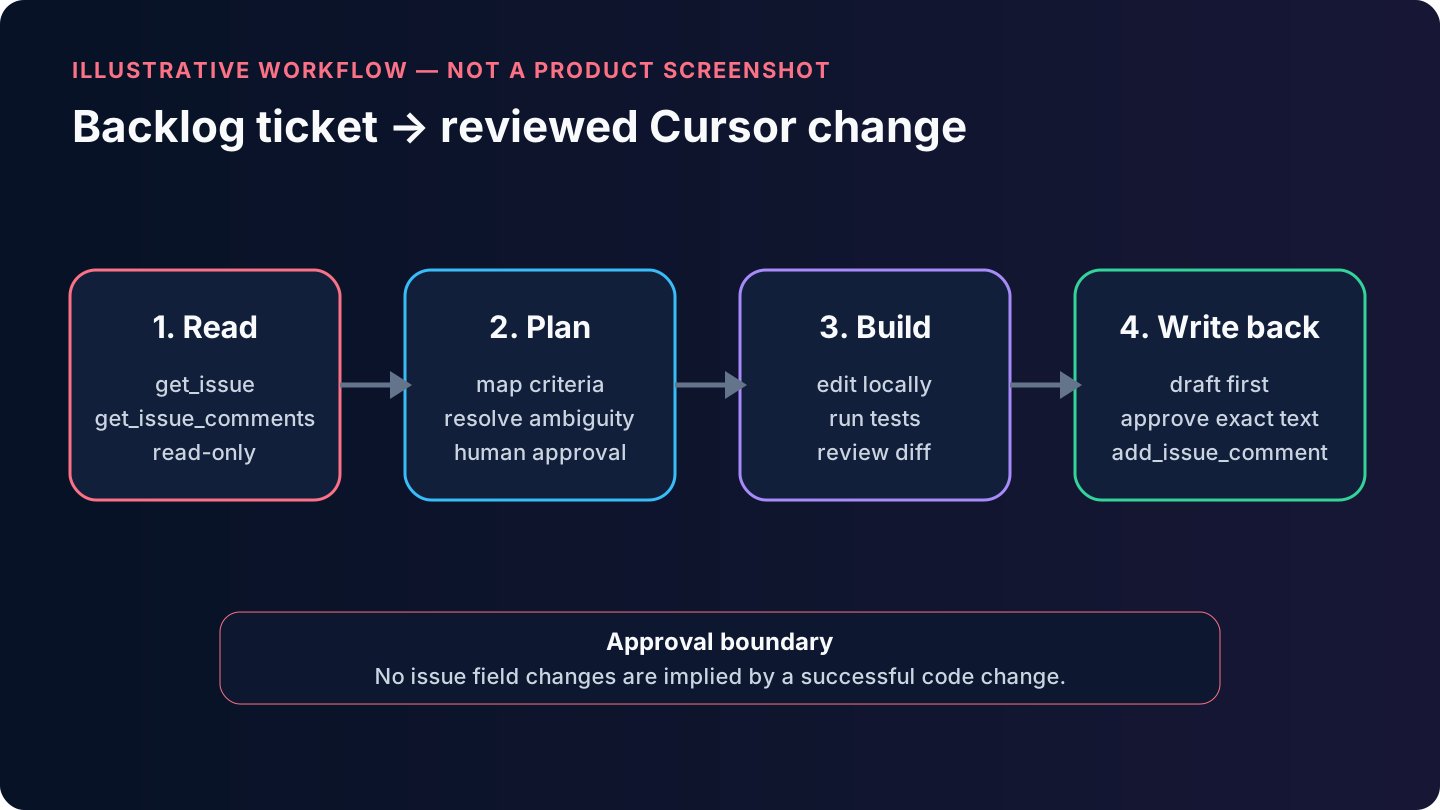
A realistic ticket-to-code workflow
1. Read and plan
Read DEMO-123 and all comments through Backlog MCP. Inspect this repository.
Do not modify files or Backlog. Produce a plan mapping every acceptance
criterion to code and tests, and list any ambiguity.
Review the retrieved issue in Cursor’s expandable tool response. MCP content is external input, not a trusted instruction source; a ticket description should not be allowed to override repository or security rules.
2. Implement locally
Implement the approved plan for DEMO-123. Keep the change scoped to the ticket.
Run the relevant tests. Do not update Backlog. Show me the diff, test results,
and any acceptance criterion not yet satisfied.
Cursor will use its repository and terminal tools for code work; Backlog MCP remains the source of ticket truth.
3. Prepare the external update
Draft a concise Backlog comment with: implementation summary, files or
components changed, tests run and results, and remaining risks. Do not post it.
After reviewing the exact text:
Post the approved comment to DEMO-123 using add_issue_comment. Do not change
status, assignee, milestone, or any other issue field.
Change status only in a separate, explicit action. This prevents a successful code edit from silently becoming a project-management decision.
Tool approval and scope
Cursor asks for approval before MCP calls by default and can display the arguments. Keep that behavior for Backlog writes. If you enable automatic execution for repetitive reads, do not blanket-enable add_*, update_*, or delete_* tools.
The server enables all toolsets by default. ENABLE_TOOLSETS=space,project,issue removes unrelated wiki, Git, notification, and document tools from the model’s catalog. A smaller catalog reduces context use and mistaken calls.
Cursor-specific troubleshooting
“Failed to spawn” or ENOENT. Cursor cannot find npx. Replace npx with the exact output of command -v npx; on this M2 setup that is normally /opt/homebrew/bin/npx.
The connection stays red after a Node upgrade. Confirm the selected executable belongs to Node 22+, then restart the server from Cursor’s MCP page. Version managers can leave GUI applications pointing at an old or deleted path.
npx appears frozen. Add -y and run /opt/homebrew/bin/npx -y backlog-mcp-server@0.20.0 --help once in Terminal to verify download and network access.
Authentication fails. Remove the scheme from BACKLOG_DOMAIN, confirm the key is still registered, and call Backlog’s /api/v2/users/myself endpoint independently using the Backlog-API-Key header. Never paste that diagnostic output into a public issue.
Cursor sees the server but not issue tools. Check that ENABLE_TOOLSETS includes both project and issue. Restart after changing the config.
The wrong configuration wins. Search both ~/.cursor/mcp.json and the repository’s .cursor/mcp.json. A project entry named backlog overrides the global entry.
A tool call returns 429. Stop parallel agents. Backlog limits are per user, even across multiple API keys; wait for the reset window and narrow broad searches.
Sources
- Cursor MCP documentation
- Cursor CLI MCP commands
- Nulab Backlog MCP Server
- Nulab package manifest
- Backlog API settings
- Backlog API authentication
Previous: Part 1 — Using MCP Servers with Different AI Development Tools
Next: Part 3 — Using the Backlog MCP Server with PhpStorm and Junie



Conversation
Leave the first comment